Canvas-first editing
Build sections directly on the page canvas, then switch between desktop, tablet, and mobile views without leaving the editor.
PDS Builder is the upcoming visual site builder for teams that want fast page creation, reusable components, responsive controls, and lean frontend output.
Status
Coming soon
Output goal
Static + islands
Built for
WordPress
Current build
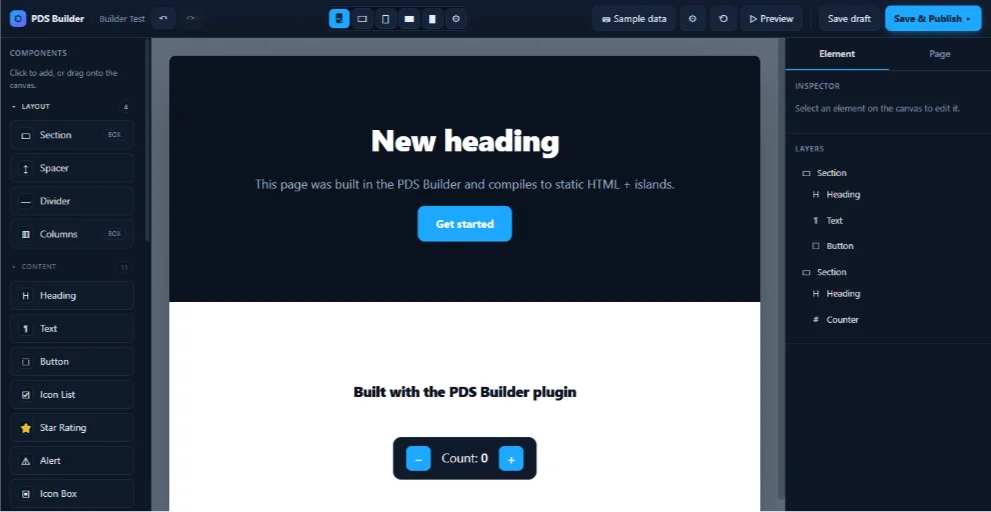
The working editor already shows the core shape: a component palette, centered page canvas, device preview controls, sample data controls, undo/redo, preview, save draft, publish, an element inspector, and a layers panel.
Build sections directly on the page canvas, then switch between desktop, tablet, and mobile views without leaving the editor.
Start with real layout and content blocks: sections, spacers, dividers, columns, headings, text, buttons, icon lists, ratings, alerts, icon boxes, and counters.
Use the right-side panel for selected element settings and the layers tree for page structure, so complex pages stay easy to reason about.
The current build is aimed at static HTML with small interactive islands, keeping the frontend focused instead of turning every page into a heavy runtime.
Workflow
The goal is a builder that feels familiar immediately, but still respects production WordPress constraints: clean structure, portable output, predictable publishing, and a small frontend footprint.
Choose or drag components onto the canvas.
Edit structure through layers and element settings.
Preview the page, save drafts, and publish when ready.
Compatibility
PDS Builder sits beside the existing WordPress and page-builder compatibility work. The wider Builder Suite remains builder-aware, while PDS Builder focuses on a native PDS editing experience.
 WordPress
 Elementor
 Breakdance
 Bricks
 Divi
Divi